Your show. Their couch.

VisionMixer Cloud brings remote guests into your live show. They join with a 6-character code — from any browser or the free app, no accounts ever — and land in your mixer as sources you can frame, fade and switch like everything else. Echo-free multi-guest audio, built in.

For podcasts · interviews · panels · co-streams · remote worship · talk shows

Hosting is a monthly add-on for VisionMixer · guests are always free

Live with a guest in three steps

1

Start a show

One click in VisionMixer gives you an invite code. Read it out, paste it in chat, or email invites straight from the app.

2

Guests join free

They open visionmixer.app/join in any browser (or the free app), enter the code, check their camera and mic — and they're in. No account. No payment. Ever.

3

They're in your mixer

Each guest arrives as a video source and an audio fader. Drop them into ready-made guest scenes, or design your own — they slot in automatically.

Guests as sources

Remote people, local control

A guest isn't a window you tile around — it's a source in your mixer. Frame them, round their corners, put them behind your lower third, ride their fader. Ready-made guest scenes (1:1 split, host + 3, quad grid and more) fill themselves as people join, and you can swap who's in which box with one click.

  • Every guest gets a video layer and an audio channel strip
  • Guest scenes fill automatically, in join order or your order
  • Invite, kick or block guests mid-show from the Cloud tab
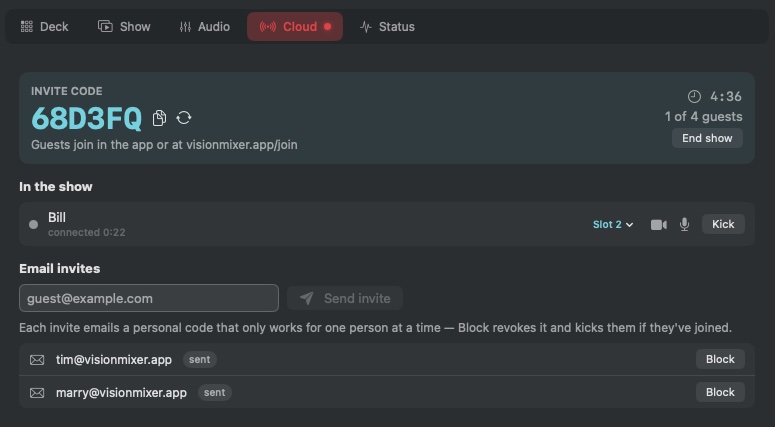
The VisionMixer Cloud tab while hosting: a large invite code, a guest roster with connection quality, scene-slot and kick controls, and email invites with one-click Block.

The guest experience

So easy your least technical guest can do it

Guests click a link or type a code. A camera-and-mic check makes sure they're on the right webcam before anything goes live, then they see your produced show and hear everyone — except themselves, so there's never an echo. Guests with the free VisionMixer app can even send you their own produced feed, overlays and all.

  • Works in any modern browser — Mac, Windows, phone, tablet
  • Camera & mic check before they go live, with device pickers
  • Email invites with personal codes you can revoke at any time
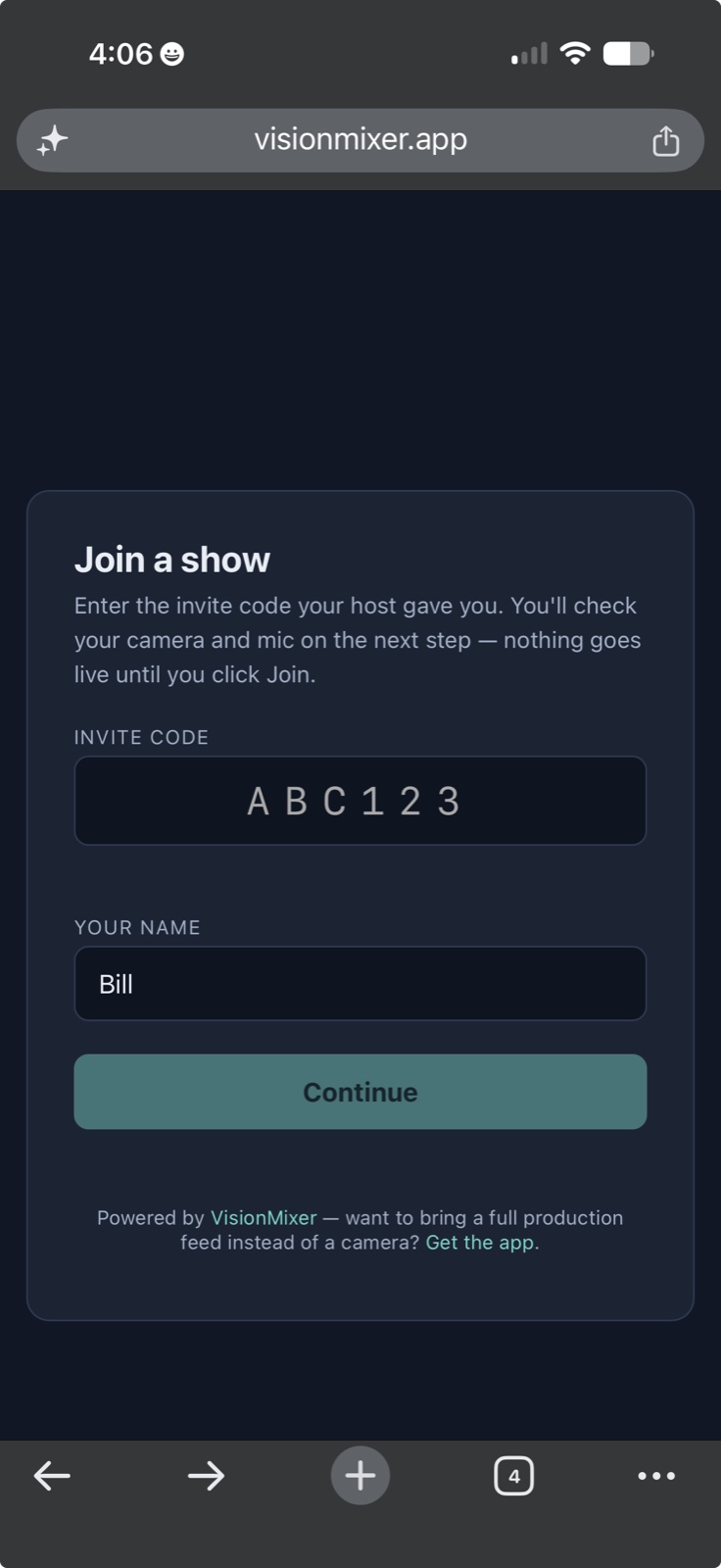
Joining a VisionMixer show from an iPhone: enter the 6-character invite code and a name — no account, no app required.

Broadcast audio

Everyone hears the show. Nobody hears themselves.

Multi-guest audio is where remote productions usually fall apart — echo, feedback, guests talking over a delayed mix. VisionMixer Cloud does it the way broadcast trucks do: every guest hears your show minus their own voice, automatically. You mix each guest on their own channel strip, with the same tools as every other source.

  • Echo-free by design — not by echo cancellation luck
  • Per-guest faders, mute, monitoring and routing
  • Your music, sound effects and mics reach guests too
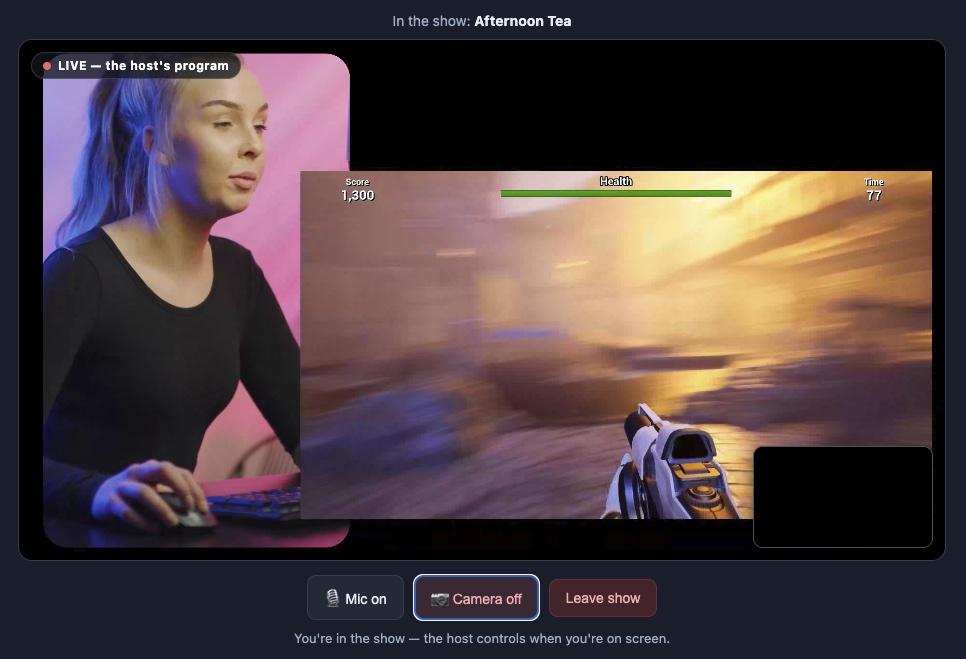
What a guest sees: the host's live program with a LIVE badge, plus their own mic, camera and leave controls. They hear the whole show — minus themselves.

Hosting plans

Cloud Shows is a monthly add-on for VisionMixer ($99 once, 14-day free trial). Your guests never pay — only the host subscribes. Subscribe right inside the app; cancel anytime.

Cloud Starter

$15per month · USD
  • Up to 4 guests at once
  • 40 guest-hours per month
  • Shows up to 3 hours
  • Browser + app guests, email invites
Get VisionMixer

Subscribe in the app: click “Cloud Show”, pick a plan

Cloud Pro

$29per month · USD
  • Up to 12 guests at once
  • 100 guest-hours per month
  • No show length limit
  • Browser + app guests, email invites
Get VisionMixer

Subscribe in the app: click “Cloud Show”, pick a plan

Trying VisionMixer? During the 14-day trial you can host cloud shows free at Starter limits — no subscription needed.

Cloud questions, answered

What do my guests need?

A browser — that's it. They enter a 6-character invite code at visionmixer.app/join, check their camera and mic, and they're in your show. Guests who want to send a fully produced feed (overlays, multiple cameras) can use the free VisionMixer app instead. Either way: no account, no payment, ever.

Do guests pay anything?

Never. Only the host subscribes. Invite as many different people as you like across the month — the plan limits are about how many are connected at once and total connected time.

What's a “guest-hour”?

One guest connected for one hour. A one-hour show with three guests uses three guest-hours. Starter includes 40 a month (think: a weekly 2-hour, 4-guest panel), Pro includes 100.

Will it work for guests on strict office networks?

Yes. Connections are encrypted end-to-end in transit and can fall back to standard HTTPS (port 443), which corporate firewalls allow.

How's the quality and latency?

Guests connect over WebRTC — the same real-time technology behind video calls — so conversation feels natural, not delayed. Video quality adapts to each guest's connection, and you can watch per-guest connection health live in the app.

Can I cancel anytime?

Yes. Manage or cancel through Stripe's billing portal right from the app — hosting runs to the end of the paid period. Everything else in VisionMixer keeps working; Cloud Shows is a pure add-on to the app you already own.

Put on a show. Together.

Download VisionMixer, start your trial, and host your first cloud show today.

Download for macOS