The audio mixer
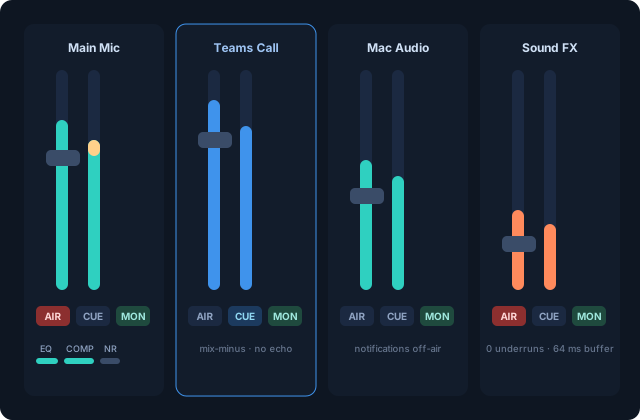
Every audio source is a channel with one fader and four routing buttons:
- AIR — into the program mix (what the stream, recording and call hear)
- CUE — solo into your headphones, momentarily (clears on relaunch, like a console)
- MON — into your monitor outputs, independent of AIR
- AFV — audio follows video: AIR flips automatically when the bound video source is on program
So "music on air but not in my ears" and "call in my ears but never on air" are both just button states.
Inputs
Add from the mixer's + menu: microphones and interfaces, capture-card audio, System Audio (everything the Mac plays, via screen capture — with an app-exclusion list on right-click), a single app's audio, or Mac Audio → Mixer, which points the Mac's default output at the VisionMixer System device so notifications and browsers arrive as a fader instead of playing over your show.
Each channel takes insert filters: EQ, dynamics, and real-time spectral noise reduction.
Outputs
- Program output — where the on-air mix renders (usually VisionMixer Mic so calls hear it).
- Monitor outputs — as many as you like (headphones, room speakers…), each with its own device, master fader and mute, all carrying the monitor mix.
Reliability
Live channels run through jitter-buffered engines that absorb delivery hiccups and clock drift — the historical cause of crackle. The Status tab → Audio health card shows each channel's buffer depth and underrun count (zeros are the goal), and Restart Audio (mixer header, Status tab, or a deck tile) rebuilds every engine mid-show if a device misbehaves.