The Media Studio
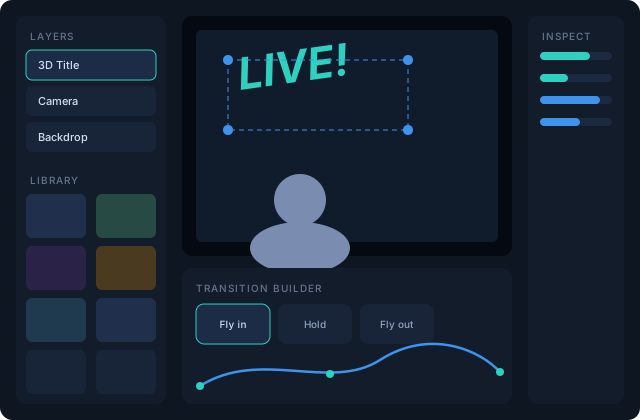
The Media Studio (teal button in the title bar) is the prep room — everything gets browsed, built and rehearsed here before it touches air.
The library
Every asset in one place, organized by type — cameras, clips, images, overlays, shapes, text, 3D text, transitions, sounds — with search and a compact list toggle. The library is the one add surface: click anything to stage it, or use its + menu to create something new.
Deleting from the library is guarded: if a scene, cue or transition uses the asset, VisionMixer tells you exactly what would be affected before you confirm.
Layers and the stage
The left panel mirrors the main canvas's layer stack; the stage in the middle is a full-parity canvas editor — same handles, same inspector, same effects. Prep a look here, save it as a scene, and it's ready on the switcher.
Create with AI
The Create pane generates assets in place — overlay graphics and stills from a text prompt, and sound effects for the soundboard. Generated items land directly in your library. Configure providers and keys first: see AI features.
The transition builder
Selecting a transition in the library (or creating one) opens the builder on the stage — that's a big enough topic for its own page.