The Show Deck
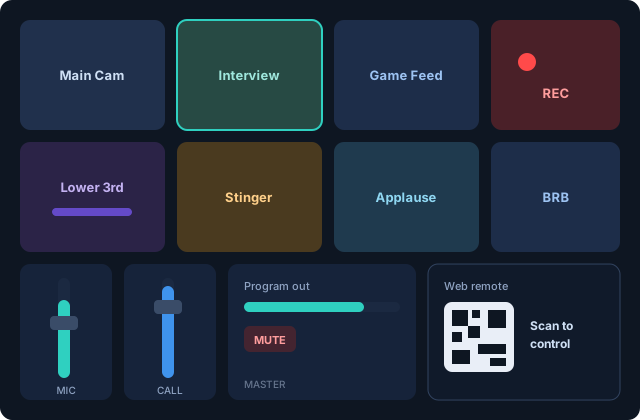
The Deck tab is your show's control surface: a grid of tiles you design.
Tile types
Add tiles from the header + (the palette is searchable):
- Scenes — load or take a saved scene, optionally with its own transition override
- TAKE / CUT / punch black / BRB
- Record start/stop, Save Replay, program screenshot
- Go live per stream destination
- Sound pads — restart, stop or loop modes
- Channel strips — full mixer strips with meter, fader and routing, plus master output strips (program and each monitor) with mute
- Fire graphics and fire transitions (animated lower thirds with holds)
- Restart audio, virtual camera and NDI toggles
Editing the deck
Click Edit: drag tiles to arrange (they pin to a grid), drag the corner handle to resize — three preset sizes or any width × height — and tap a tile to configure it. Click Done or just click away to finish.
Beyond the window
- Global hotkeys — assign a key to any tile; it works while VisionMixer is in the background.
- Mini mode (⌃⌥⌘M) — a compact, always-on-top floating deck.
- Web remote — scan the QR code (Settings → Remote) and the deck runs in any phone browser on your network, live tallies included.